
Time Clock: Easy Tracker
Time Squared (TSQ Publishing Corp.)Business
4.76.09K Reviews
- Version
- 3.4.1746
- Installs
- 1.00M
- Age Rating
- Everyone
Screenshots
Our Review of Time Clock: Easy Tracker
 Analysis by Appyee
When I use Time Clock: Easy Tracker, the key question is not just how quickly I can start a timer; it is whether I can keep my records dependable as my workday shifts between places, tasks, and internet connections. A mobile time log is most useful when recording a shift takes little effort, but I also want to know how much I can trust it when plans change or I make a mistake. That balance is what makes this business app worth considering for people who want a clearer account of their working hours.
Where connectivity enters the routine
A time clock often gets used at exactly the moments when attention is elsewhere: arriving at a job, leaving a meeting, or switching from one piece of work to another. A quick clock-in action can be convenient, but any workflow that depends on current information being available may feel less smooth when a connection is unreliable. I would make a habit of checking that an entry has appeared as expected rather than assuming every tap has been recorded correctly.
That small check matters most when the record will later be used to prepare an invoice, review a shift, or explain how a project’s hours were spent. I would not wait until the end of the week to discover that an important entry needs attention. A brief look after a shift or task change is a practical safeguard, especially for people whose work takes them between client sites or shared workspaces.
Useful in motion, with a little discipline
The pocket-sized format suits freelancers, consultants, field workers, and anyone whose hours do not fit neatly into a desk-based routine. A person who visits several clients in a day can use separate work records to make the day easier to review later, while someone working from home may use task changes to understand where the afternoon went. I find that this kind of tracking is most helpful when the categories are simple enough to choose quickly.
For example, imagine a freelance designer who begins the morning on a client project, pauses to answer unrelated messages, then returns to the design before a call. If each switch is recorded consistently, the resulting history can make the difference between a vague estimate and a useful account of time spent. But tracking every tiny interruption can become a chore. I would reserve entries for meaningful tasks or billable work, rather than turning the app into a minute-by-minute diary.
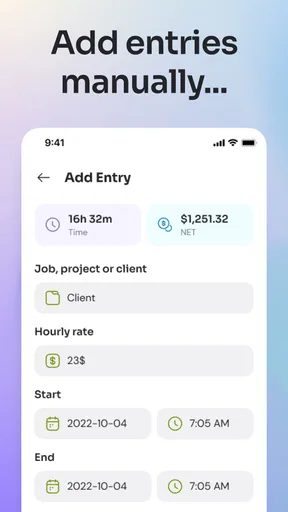
On a busy shift, the main challenge is remembering to stop or change the clock. The app’s ability to edit entries, noted in the original review, gives users a way to correct an imperfect log, but corrections still require attention. A sensible routine is to check the previous entry when starting the next one and make a quick correction while the day is still fresh. That is more reliable than reconstructing a week from memory.
What to do when a record looks wrong
Any timer-based workflow can produce messy records if a clock keeps running after a task ends, or if a worker forgets to start it at the beginning. I would treat the app’s editable entries as a recovery tool, not as a substitute for a consistent habit. Before using tracked hours for payroll, client billing, or a formal timesheet, review the dates and durations and compare them with whatever work evidence you already keep.
That review is particularly useful for people who share responsibility for timekeeping. A manager may want to look over submitted hours before relying on them, while an individual contractor may compare a report with calendar appointments or project notes. The app can help organize the record, but the person entering and checking the information remains responsible for its accuracy. For high-stakes compliance or complex approval workflows, a dedicated workforce system may be a better fit.
Keep the record useful without overtracking
Detailed time tracking can reveal patterns, but more detail is not automatically better. If every short interruption gets its own category, choosing labels can take attention away from the work itself. I would start with a small set of project or task names, then add distinctions only when they answer a real question, such as which client work is consuming the most time or whether a recurring assignment is taking longer than expected.
Reports become more useful when entries are consistent. If the same project is labeled in several different ways, a summary may be harder to interpret, so settling on clear names early can save cleanup later. A weekly review is a good middle ground: it is frequent enough to catch forgotten clocks and confusing labels without requiring constant administration. People who only need an occasional rough estimate may find a simple note or calendar entry less demanding.
It is also worth thinking about what a time record is for before relying on it. Personal productivity tracking, client billing, and staff attendance have different expectations. A lightweight tracker can be convenient for seeing how work time is distributed, but a business that needs formal approvals, payroll processing, or detailed access controls should compare it with tools built specifically for those responsibilities.
Getting Started with Time Clock: Easy Tracker
First off, setting up Time Clock: Easy Tracker is a breeze. You can download it from both the Play Store and App Store, so it’s available for Android and iOS users alike. Once you have it installed, the interface is super intuitive, which is perfect for those of us who might not be the most tech-savvy.
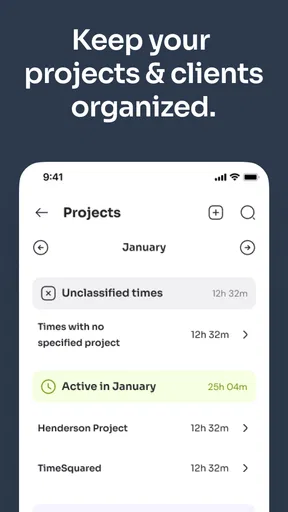
The app allows you to create different projects or tasks, and you can easily start and stop the clock as you work. It’s like having a personal assistant right in your pocket, ensuring you’re staying on track and not losing time to distractions.
Features That Stand Out
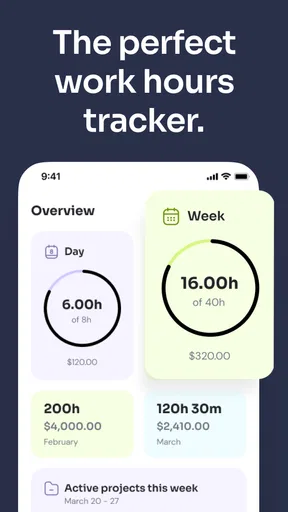
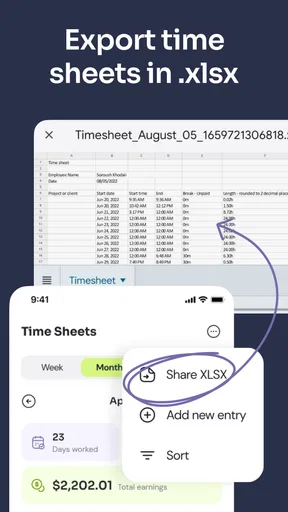
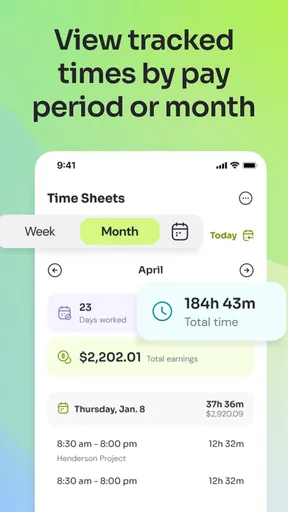
One of the things I love about this app is the ability to generate detailed reports. You can see exactly where your time is going, which is crucial if you want to boost productivity. The reports can be customized, so whether you need a daily, weekly, or monthly overview, you’re all set.
Another neat feature is its integration capabilities. I’ve synced it with my calendar, which means I can view all my tasks and appointments in one place. It’s like having a bird’s-eye view of my schedule, making it easier to adjust plans if something unexpected comes up.
Why You’ll Love It
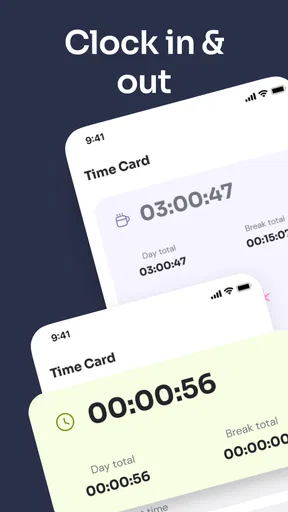
This app is a lifesaver for freelancers and remote workers. Trust me, I know how hard it can be to track billable hours accurately. With Time Clock: Easy Tracker, you can clock in and out with just a tap, and it calculates everything for you. No more manual logs or spreadsheets!
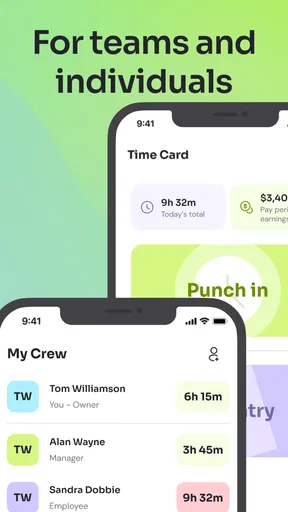
Plus, if you’re managing a team, you can easily see who’s working on what and when. This transparency helps keep everyone accountable and ensures that projects are moving along smoothly.
A Few Things to Keep in Mind
While the app is pretty solid, there are a couple of things to be aware of. For instance, if you’re not careful, you might forget to stop the clock, which can throw off your time logs. But hey, it happens to the best of us. The good news is that the app allows you to edit entries, so it’s not a huge deal.
Also, while the basic version is free, there are some premium features that require a subscription. Depending on your needs, it might be worth investing in the upgraded version for the added functionality.
Final Thoughts
All in all, Time Clock: Easy Tracker is a fantastic tool for anyone looking to get a handle on their time management. It’s user-friendly, packed with useful features, and adaptable to different workflows. Whether you’re trying to be more productive in your personal life or need a reliable way to track work hours, this app is worth checking out.
So, if you’re ready to take control of your time, give it a shot! You can download it right now and start making every minute count.
Who will get the most out of it?
For a solo worker, the strongest case is straightforward: keep one running record of work rather than trying to remember hours at the end of the day. The app is free to start, and its business focus makes it a natural option for people who want to sort time by project or task and then review the result. Time Squared, also known as TSQ Publishing Corp., develops it. Its 4.7 average from around 24,000 ratings suggests many users find the approach worthwhile, though I would still judge it by whether the routine suits your own work.
A small team could also benefit if the goal is basic visibility into who is working and when. The practical trade-off is that the team needs shared habits: people must use task names consistently, remember to clock in and out, and review entries before treating them as authoritative. If you need a manager-controlled approval chain or a comprehensive employee-management suite, I would look at a more specialized service instead of assuming a simple time clock can cover every administrative need.
Choosing between a timer, a spreadsheet, and a larger system
Compared with a spreadsheet, a tap-to-start timer asks less of you in the moment and can reduce the amount of arithmetic involved later. A spreadsheet may still be better if your process depends on custom formulas, unusual billing rules, or a format a client already requires. Compared with a full workforce platform, this app is more appealing when your priority is personal or lightweight time recording rather than managing a complex organization.
There is also a useful middle path: keep the app as the working log, then check its reports against calendar commitments or project notes before sending a bill. That preserves the convenience of starting a timer while giving you a second reference for unusual days. I would not treat a calendar as a replacement for a time clock, because an appointment shows when something was scheduled, not necessarily how long the work actually took.
Price, access, and a sensible trial
The app is free to download and is rated for Everyone. In-app purchases range from $0.99 to $179.99 per item, so I would explore the no-cost workflow first and only consider paying once a specific limitation affects my routine. That avoids buying extra capability simply because it is offered. The current version is 3.4.1658, and it requires Android 7.0 or later; people on older Android devices should check compatibility before planning to use it.
It has been available since January 14, 2019, and has more than 1 million installs. Those figures can help establish that it is an established option, but they do not answer the personal questions that matter most: whether the task setup feels quick, whether the reports suit your records, and whether the app fits your team’s process. I would test it on a normal workday, including one task switch and one end-of-day review, before making it part of a billing or attendance routine.
My connectivity verdict
For me, the app’s appeal is its simple timekeeping pattern: organize work, start and stop the clock, then use reports to inspect where the hours went. The mobile format can make that routine easier to follow across a changing day, but good records still depend on checking entries and building a habit. I would recommend trying it if you want a practical tracker for personal work hours, freelance projects, or a small team with uncomplicated needs.
I would choose something else if my work required strict attendance controls, elaborate approvals, or a guaranteed process designed around formal payroll. And if I only wanted a rough estimate now and then, a calendar or basic note might be enough. For everyone in between, this is a reasonable place to begin: use a small number of clear tasks, review the log regularly, and decide whether its reports and paid options genuinely solve a problem in your day.
Verdict
Strengths of Time Clock: Easy Tracker
- Intuitive user interface for easy navigation.
- Customizable settings to fit business needs.
- Seamless integration with payroll systems.
- Real-time data syncing across devices.
- Comprehensive reporting tools available.
Limitations of Time Clock: Easy Tracker
- Limited offline functionality.
- Requires subscription for premium features.
- Initial setup can be time-consuming.
- Limited customer support hours.
- Occasional syncing delays reported.
Similar Picks in This Category
View All
LinkedIn: Community & Network
LinkedIn3.8

Zoom Workplace
zoom.com4.1

Microsoft Teams
Microsoft Corporation4.6

Meta Business Suite
Meta Platforms, Inc.4.6

Webex Meetings
Cisco Systems, Inc.4.5

TeamViewer Remote Control
TeamViewer4.4
Frequently Asked Questions
What features does Time Clock: Easy Tracker offer?
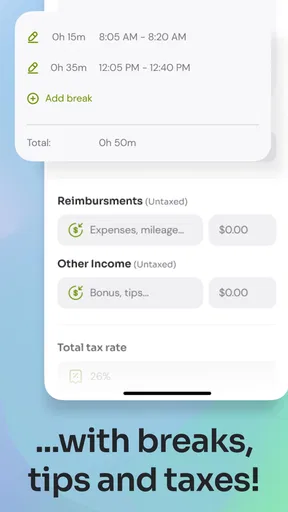
Time Clock: Easy Tracker provides a comprehensive suite of features designed to streamline time management for users. It includes functionalities like clock in/out, break tracking, overtime management, and report generation. Additionally, the app offers cloud synchronization, allowing users to access their data across multiple devices seamlessly.
Is Time Clock: Easy Tracker suitable for both individual and team use?
Yes, Time Clock: Easy Tracker is versatile enough to cater to both individual users and teams. It supports multiple user accounts, making it easy to track time and productivity for team members. The app also includes features for assigning tasks and monitoring team progress, making it ideal for collaborative environments.
How secure is the data stored on Time Clock: Easy Tracker?
Time Clock: Easy Tracker prioritizes user data security through encryption and secure cloud storage. All data transferred between the app and servers is encrypted to prevent unauthorized access. Users can also set up secure login credentials and two-factor authentication for added protection, ensuring that their information remains confidential.
Can Time Clock: Easy Tracker integrate with other productivity tools?
Yes, Time Clock: Easy Tracker offers seamless integration with several popular productivity tools and platforms. Users can connect it with apps like Google Workspace, Microsoft Office, and various project management software, allowing for a more streamlined workflow and enhanced productivity across different applications.
Is there a cost associated with using Time Clock: Easy Tracker?
Time Clock: Easy Tracker offers both free and premium versions. The free version includes basic features suitable for individual users, while the premium version provides advanced functionalities like detailed analytics, team management tools, and priority customer support. Users can choose the plan that best fits their needs and budget.
